Briifd vs. Meltwater and Cision: An Honest Comparison
When to use a traditional monitoring tool, when to use Briifd, and why most agencies end up using both.
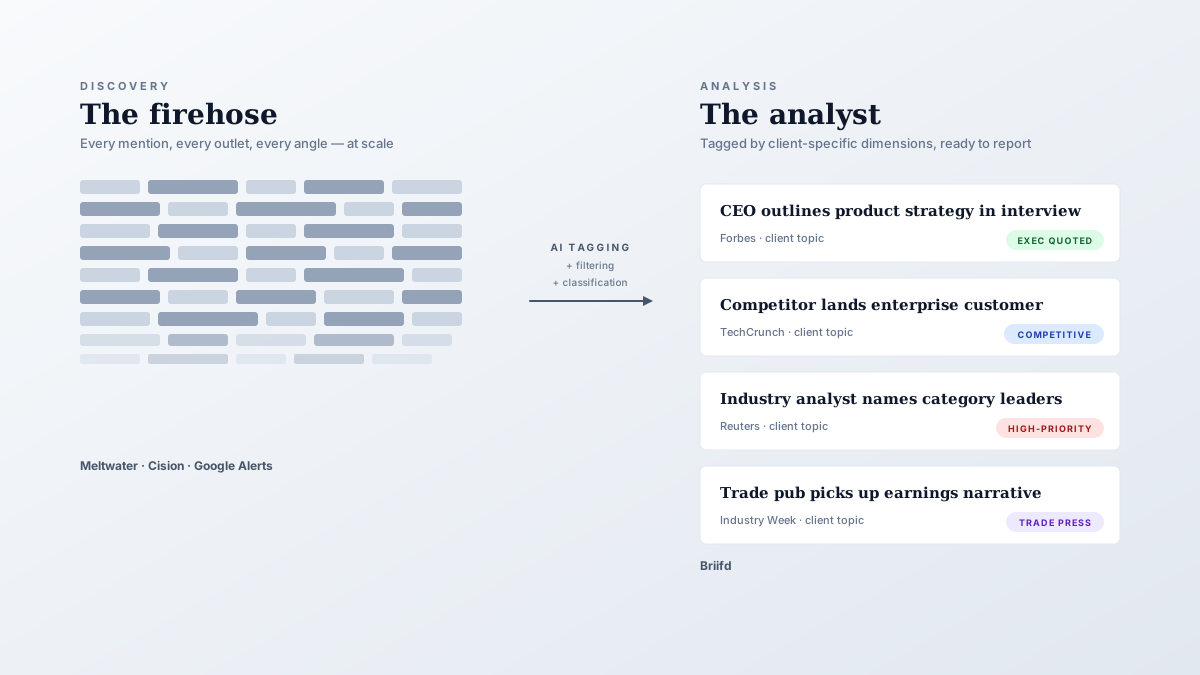
We hear this a lot from prospects evaluating tools: “How are you different from Meltwater?”
The honest answer is that we’re solving a different problem, and the two tools are usually complementary rather than competitive. This post lays out the actual comparison.
What Meltwater and Cision are good at
The legacy monitoring tools — Meltwater, Cision, and a handful of regional players — solved a specific problem well: discovery at scale.
If you need to know every place a brand is mentioned across 270,000 sources globally, that’s their job. They run massive crawlers, ingest broadcast and social, and surface mentions you’d never find with a Google Alert. Their breadth is genuinely impressive, and for clients with global presence or unusual ICP, that breadth is non-negotiable.
What they’re less good at: the analytical layer that sits on top.
Their reporting tools are templated — built to produce one kind of report (a tidy mention dashboard) for one kind of buyer (a marketing director who wants impressions). That’s fine if your reporting needs are also templated. It’s a struggle if you’re a PR pro whose clients each have different goals, narratives, and reporting expectations.
Where Briifd fits
Briifd doesn’t try to compete on discovery. We don’t run our own global crawler — we’d lose to Meltwater on day one if we tried.
Instead, Briifd sits downstream. Whatever monitoring tool you use, forward the alerts (or paste the URLs, or use the Briifd Chrome extension) and Briifd handles:
- AI tagging tuned to your client — not generic positive/neutral/negative
- Per-client custom dimensions — the things that actually matter to each account
- Report generation — narratives, not just mention counts
- Paywall recovery — full article text from outlets your monitoring tool can’t reach
- Long-tail catches — Substacks, niche blogs, X posts you’d otherwise miss
Meltwater is the firehose. Briifd is the analyst.
Pricing comparison
The other big difference: pricing.
Meltwater and Cision are enterprise-priced. Annual contracts, custom quotes, generally starting in the low five figures and scaling up fast based on seat counts and source breadth. They’re built for in-house comms teams at large companies and big agencies that can absorb that line item.
Briifd is priced for the rest of the market. We have a free tier with usage caps, and paid plans start at $89/month — scaling with usage, not seats. For a boutique agency or in-house team of three, the annual cost difference is meaningful.
What about the AI features Meltwater added?
Meltwater shipped AI summarization and sentiment in 2024. Cision followed with their own AI layer. So is Briifd’s AI angle still differentiated?
In our view, yes — and the difference is in tunability.
Meltwater’s AI: global, off-the-shelf
Built into the platform as a global feature. You get sentiment, you get summaries, you get topic clusters. They’re decent, but they apply the same model and the same prompts across every client. Per-client customization of the analytical layer is limited.
Briifd’s AI: the customization layer itself
Every topic gets its own tag schema, its own saved prompts, its own context. The AI working on a hospital coalition’s coverage knows which entities count as in-network and which are adversaries in the cost-blame conversation. The AI working on a SaaS client knows about that client’s competitors, product positioning, and target buyer personas.
Same underlying models, very different output, because of the orchestration around them.
Side-by-side
The categories where each tool wins. Most agencies end up running two of them, not one.
| Category | Meltwater / Cision | Briifd |
|---|---|---|
| Discovery breadth | Massive global crawler — print, broadcast, social, podcast | None — uses your existing discovery sources |
| Analytical layer | Templated reports + off-the-shelf AI | Per-client tag schemas + per-topic saved prompts |
| Customization | Limited; same model and prompts across clients | Each topic has its own context, tags, and prompts |
| Paywalled outlets | Snippets only | Full text via the Chrome extension |
| Pricing | Enterprise contracts; low five figures and up | Free tier; paid plans from $89/month |
| Best fit | In-house comms at global brands; teams that need broadcast/social | Boutique agencies, in-house SMB comms, specialty practices |
When Meltwater is the right answer
Be honest with yourself if any of these apply:
- You need real-time broadcast and podcast monitoring at global scale
- You report on social listening across millions of posts/day
- You’re an in-house team at a global brand with 50+ markets
- Your clients are buying “monitoring” not “analysis”
In any of these cases, Meltwater (or Cision, or Sprinklr, or one of the other enterprise platforms) is probably the right fit. Briifd isn’t trying to displace that.
When Briifd is the right answer
Where we win consistently:
- Boutique and mid-market agencies (5-50 person)
- In-house comms teams at SMBs and growth-stage companies
- Specialty practices (HNWI, healthcare, B2B SaaS, regional)
- Anyone whose monthly reporting is currently a multi-day manual lift
- Anyone who needs full text from paywalled outlets for AI analysis
The shared trait: clients who care about narrative and message alignment, not just mention counts. If your reports include analysis, framing, and recommendations — not just numbers — Briifd’s analytical layer earns its keep.
When they’re complementary
The most common setup we see at active accounts:
- Meltwater (or Google Alerts) handles discovery
- Email forwarding pipes alerts into Briifd
- Briifd handles tagging and reporting
Best of both layers — the discovery breadth from Meltwater, the analytical depth and reporting from Briifd.
A note on switching costs
If you’re already on Meltwater or Cision, the switching cost question is fair.
Our take: don’t switch. Add Briifd as the analytical layer, keep the legacy tool as long as it’s pulling its weight. Teams that try this often find Briifd justifies its price within the first month or two, separately from any decision about the legacy contract.
Want to see how Briifd handles your coverage? Get started free — no credit card required.
Try Briifd on your own coverage
Free tier — no credit card, get started in a few minutes.
Related reading
Your First Week With Briifd: A Checklist
A day-by-day plan for getting your first client onboarded, tagged, and producing reports — without overhauling your existing stack.
Case StudiesCase Study: Mapping the Blame in Healthcare Cost Coverage
How a Midwest hospital coalition uses custom AI tagging to track who gets blamed for healthcare costs — and why generic monitoring tools couldn't measure that.
Workflow TipsA Week With Briifd: 15 Minutes, Not Eight Hours
Briifd isn't a tool you live in. Here's what 15 minutes of weekly work actually looks like — check, recover, recap, and a few clicks for the report.