How to Recover Paywalled Articles for Your Coverage Reports
WSJ, Bloomberg, FT — the outlets that matter most are the hardest to capture. Here's how to pull full article text into your reports without copy-paste gymnastics.
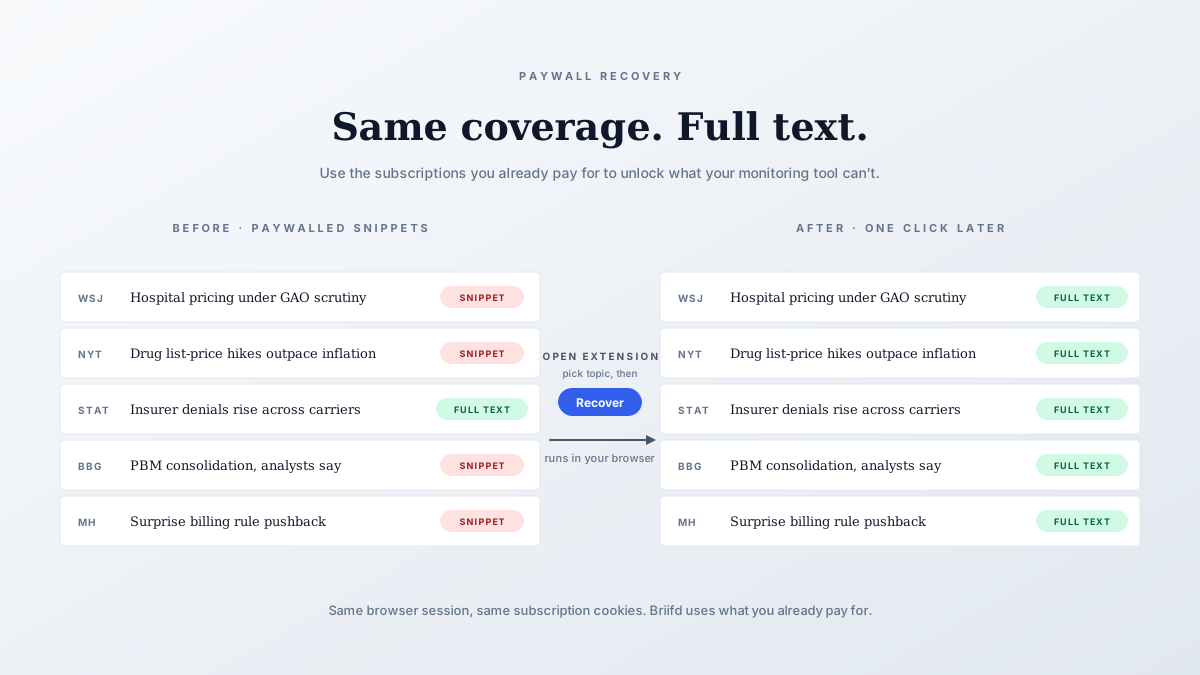
Every PR pro knows the feeling. A great hit lands in the Wall Street Journal, you click through to grab the text for your client report, and you’re staring at a “Subscribe to continue reading” wall.
You’re already a subscriber — but your monitoring tool isn’t, so the captured snippet is two sentences long.
That’s a problem if your reports lean on quotes, context, or AI analysis. You can’t summarize what you can’t read.
Why monitoring tools hit walls
Tools like Meltwater and Cision crawl the open web. When they encounter a paywall, they capture whatever the public preview shows — usually a headline, a paragraph, and a “register to read more” prompt. The full text never lands in your dashboard.
That’s not a bug. It’s an architectural limit. Most monitoring stacks scrape from a server somewhere, and that server doesn’t have your subscription cookies.
The browser-based fix
The Briifd Chrome extension takes a different approach: it runs in your browser session, so it can read what you can read.
If you’re logged into the FT in Chrome, the extension can read the article exactly as you can. The full text flows into your topic — no copy-paste, no manual transcription.
The practical flow
Here’s what setup looks like end-to-end:
- Install the Briifd Chrome extension from the Chrome Web Store
- Sign into your usual outlets (WSJ, FT, Bloomberg, NYT, Economist) — same browser session you read in
- Click the Briifd extension icon in your Chrome toolbar
- Pick a topic and click “Recover” — the extension works through that topic’s paywalled queue in the background
- The articles update in Briifd with full text, ready for AI tagging and summarization

Bulk recovery per topic
You don’t have to open each paywalled article in its own tab. Open the Briifd extension, pick the topic, click “Recover” — it works through that topic’s queue in your browser, using your existing subscription cookies, all in the background.
What this unlocks
Once the full article text is in Briifd, you can do things that are impossible with a 200-character snippet:
- AI summarization that actually reflects the article, not just the lede
- Custom tagging that catches mentions buried in paragraph 8
- Sentiment based on full context, not the first headline impression
- Report quotes pulled directly from the article, with proper attribution
This is the difference between “the Journal covered our launch” and “the Journal called our launch the most aggressive entry into the category in five years.”
The second one ends up in the executive summary. The first one doesn’t.
Outlets that work well
Most major paywalls work fine with the extension, including:
- Wall Street Journal, Financial Times, New York Times
- Bloomberg, Reuters Pro, The Economist
- Trade pubs (Adweek, Modern Healthcare, American Banker)
- Regional dailies that hide articles behind metered walls
The handful that don’t: outlets with aggressive bot detection that flag the extension’s parsing as automated. For those few, manual copy-paste is still the workaround — that’s a real but narrow exception.
A note on what this isn’t
The extension isn’t a paywall bypass. You need a valid subscription to the outlet — the extension just reuses the credentials you already have. If you can read the article in Chrome, Briifd can pull it. If you can’t, neither can we.
That’s the right line. We’re not in the business of helping anyone avoid paying for journalism. We’re in the business of making sure journalism you already paid for can actually flow into your client reports.
When you’d use this
Three scenarios where the extension earns its keep:
1. Backlog catch-up
You missed Monday’s news cycle and Tuesday’s brief is due. You’ve got a stack of articles to triage, half of them paywalled. Open the extension, click “Recover” on the topic, and it works through them in the background while you handle email.
2. High-value placement
A FT feature mentions your client. The monitoring tool grabbed the headline. You need the full quote — not paraphrased, not approximated — for the executive briefing. One click pulls it in.
3. Trend reports
You’re tracking a narrative across 60 articles over a quarter. Without full text, AI analysis on themes is useless. With full text, you can cluster by argument and see how coverage actually evolved.
Getting started
If your monitoring stack already pipes into Briifd via email or bulk paste (see setting up your data sources), the Chrome extension slots in alongside without any reconfiguration. New articles flow through. Paywalled ones get full text. Reports just get better.
Working with paywalled coverage and tired of the workarounds? Get started free and connect your first paywalled outlet in under five minutes.
Try Briifd on your own coverage
Free tier — no credit card, get started in a few minutes.
Related reading
Tuning Your AI: Custom Tags That Actually Match Your Workflow
Out-of-the-box sentiment scores don't help your clients. Here's how to set up custom tags that mirror the way your team actually thinks about coverage.
How-ToSetting Up Your Data Sources: Meltwater, Google Alerts, and Manual Adds
A practical walkthrough for plugging your existing monitoring stack into Briifd. No re-platforming, no rip-and-replace.
TemplatesYour First Week With Briifd: A Checklist
A day-by-day plan for getting your first client onboarded, tagged, and producing reports — without overhauling your existing stack.