Tuning Your AI: Custom Tags That Actually Match Your Workflow
Out-of-the-box sentiment scores don't help your clients. Here's how to set up custom tags that mirror the way your team actually thinks about coverage.
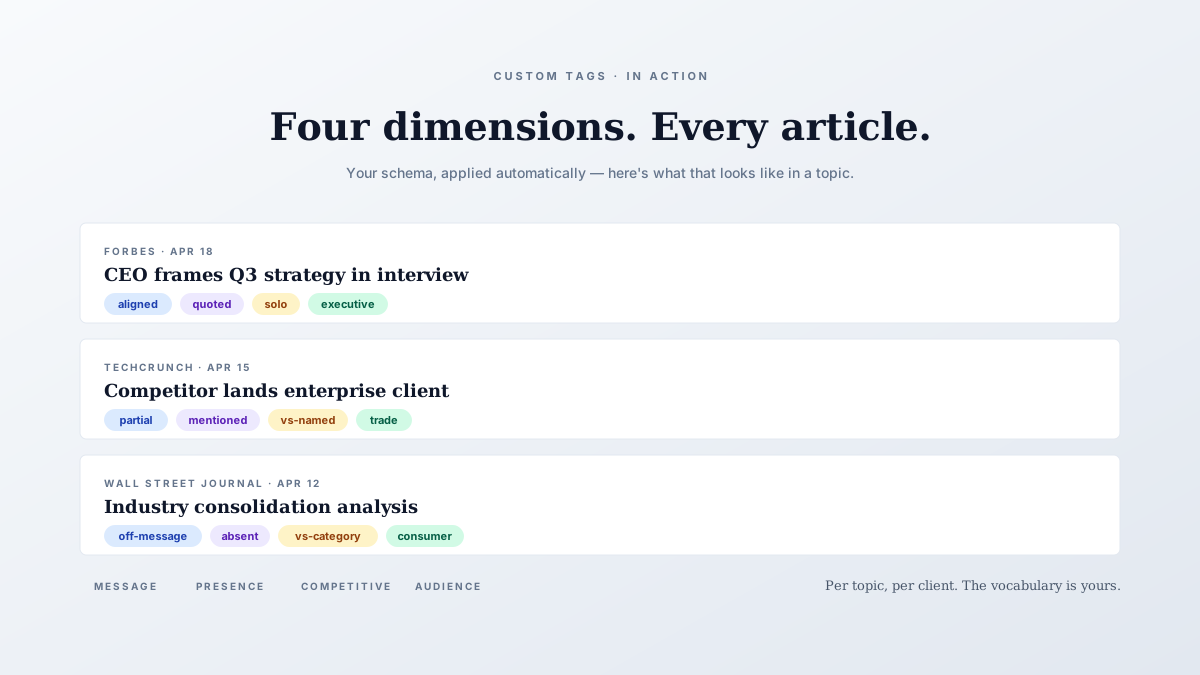
Generic sentiment is the lowest-value AI feature in PR tooling. “Positive, negative, neutral” tells you nothing your team didn’t already know after reading the headline.
Worse, it’s often wrong in ways that matter — a profile piece that mentions a regulatory inquiry comes back “neutral” when your client cares deeply that the inquiry was framed as ongoing, not resolved.
Briifd’s tagging system flips this. Instead of one global sentiment dimension, you define the dimensions that actually matter for each client. Here’s how to do it well.
Start with what your team already says
The best tag sets aren’t invented from scratch — they’re extracted from how you already discuss coverage. Look at your last three monthly reports. What words do your account leads keep using?
Patterns we see most often
- Message alignment — does the article reflect the client’s positioning? (yes / partial / off-message / contradicting)
- Spokesperson presence — was a client exec quoted? Named? Just mentioned? (quoted / named / mentioned only / absent)
- Narrative phase — is this announcement-stage, response-stage, or evergreen coverage? (launch / response / feature / evergreen)
- Audience tier — does this reach decision-makers, end-users, or industry-only? (executive / consumer / trade / niche)
- Competitive context — was a competitor named alongside? (solo / vs-named / vs-category / no-mention)
Pick three or four. More than five and the tags stop being useful — every dimension adds cognitive load when you scan the report.
Write the prompts like you’re briefing a junior associate
The AI doesn’t know what “off-message” means for your client until you tell it. A vague tag definition produces vague tags. A specific one produces useful ones.
Compare these two definitions for the same tag:
Vague: “Tag whether the article is on-message.”
Specific: “Tag as ‘aligned’ if the article reinforces ACME’s positioning as a sustainability leader (mentions their carbon-neutral goal, ESG commitments, or renewable transition). Tag as ‘partial’ if sustainability is mentioned but not centered. Tag as ‘off-message’ if ACME is positioned around price, scale, or legacy operations without the sustainability frame. Tag ‘contradicting’ if the article frames ACME as a sustainability laggard or greenwasher.”
The second one will produce consistent tags across 200 articles. The first one will produce a coin flip.
The “thoughtful intern” test
Before you save a tag definition, ask yourself: if I gave this prompt to a thoughtful intern with the article in front of them, would they know which option to pick?
If the answer is no, your prompt is missing context. Common missing pieces:
- The client’s actual positioning — the AI doesn’t know unless you tell it
- Edge cases — what counts as “named” vs “mentioned”? Be explicit
- Tie-breakers — when the article is borderline, which way should the AI lean?
You don’t need to anticipate every edge case. But the top three or four cases that come up regularly in your work? Spell them out. The AI will follow the lead.
Iterate by reviewing 20 articles
Don’t ship a new tag set straight to the next client report. Set it up, run it on the last 20 articles in the topic, and skim the results.
You’re looking for three things:
- Wrong tags. Click into the article, read it, ask why the AI tagged it that way. Usually it’s a prompt clarity issue.
- Surprising tags. The AI caught something your team would have missed. Note that — it’s a sign the tag is working harder than you expected.
- Tags that never fire. A tag option that’s never selected across 20 articles is probably either too narrow or your prompt isn’t surfacing it. Either rework or drop it.
Per-client, not per-account
A common mistake: setting up one global tag schema and applying it to every client. That defeats the purpose.
Each client gets their own topic in Briifd, and each topic gets its own tag set. The tags for a B2B SaaS company shouldn’t look like the tags for a luxury hospitality brand. The vocabulary is different, the goals are different, the narratives are different.
The tags for a B2B SaaS company shouldn’t look like the tags for a luxury hospitality brand. Different vocabulary, different goals, different narratives.
Yes, this means some setup time per client. Budget a focused half-hour per topic for first-pass tags, with shorter follow-up passes — most schemas stabilize after two or three iterations.
When to retire a tag
Tags should evolve with the client’s strategy. A tag that mattered during last year’s product launch might be dead weight now. A new initiative might need a tag that didn’t exist three months ago.
Quarterly review is the right cadence. Pull up the topic, ask:
- Which tags drove insight this quarter?
- Which tags fired but didn’t change anyone’s mind?
- What did we wish we could filter on that we couldn’t?
Drop the dead tags. Add the missing ones. Rerun on recent articles to backfill.
What good looks like
A well-tuned topic, six months in, looks like this: four custom tag dimensions, each with three to five clearly defined options, all rooted in language your team already uses.
Reports filter on these tags. Trend charts cluster on them. Executive briefings pull from them.
The output: monthly reports your clients actually read, because the dimensions match the questions their CEO is asking.
Want to build a tag schema like this for your own beat? Custom tags are part of Briifd’s paid plans, starting at $89/month — see plans.
Try Briifd on your own coverage
Free tier — no credit card, get started in a few minutes.
Related reading
Setting Up Your Data Sources: Meltwater, Google Alerts, and Manual Adds
A practical walkthrough for plugging your existing monitoring stack into Briifd. No re-platforming, no rip-and-replace.
How-ToHow to Recover Paywalled Articles for Your Coverage Reports
WSJ, Bloomberg, FT — the outlets that matter most are the hardest to capture. Here's how to pull full article text into your reports without copy-paste gymnastics.
TemplatesYour First Week With Briifd: A Checklist
A day-by-day plan for getting your first client onboarded, tagged, and producing reports — without overhauling your existing stack.