How AI Tagging Works (and Why It Matters for Your Reports)
A peek under the hood at how Briifd turns 200 articles into a structured, searchable, reportable dataset — without flattening the nuance that matters.
Most PR pros have used AI tagging in some form by now — Meltwater’s sentiment, Cision’s themes, ChatGPT for ad-hoc summarization. The output ranges from “useful” to “actively misleading.”
This post explains what’s actually happening when Briifd tags an article, and why the design decisions matter for the reports you produce.
What “tagging” actually means
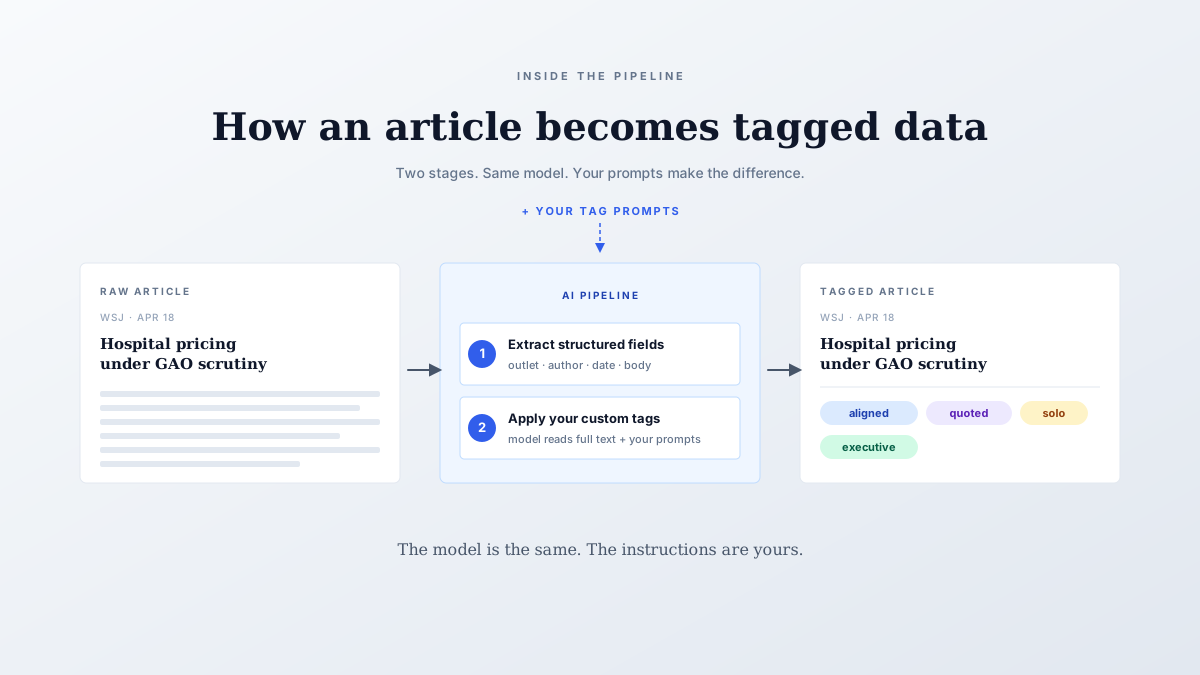
When an article lands in a Briifd topic, it gets pushed through a tagging pipeline. The pipeline does two things, in order:
- Extract structured fields — outlet, author, publish date, headline, body
- Apply your custom tags — the per-client dimensions you defined
The tags are the part most users interact with. They’re the dimensions that show up in your reports — “message alignment: aligned,” “spokesperson: quoted,” “competitive context: vs-named.”
What’s interesting is what happens between “the article landed” and “the tag got assigned.”
The model reads the full article
This sounds basic, but it’s the difference between Briifd and most legacy AI features. Many monitoring tools tag based on the headline and snippet — because those are the only fields they have. The full article text is behind a paywall the tool can’t get past.
The Briifd Chrome extension fetches full text using your subscription cookies. By the time the AI is tagging, it’s working with the complete article, including:
- The lede and the close (often where the framing lives)
- Direct quotes (essential for spokesperson tags)
- Competitive mentions buried in paragraph eight
- The article’s argumentative structure (claim, support, counter, conclusion)
Tagging on full text vs. snippet alone is roughly the difference between reviewing a movie based on the trailer vs. seeing it. Both produce a verdict. Only one is reliable.
Your tag prompt is the AI’s instruction set
This is where Briifd’s per-client design matters. The AI doesn’t have a fixed idea of what “on-message” means — it follows the prompt you wrote when you defined the tag.
Concretely: if you defined the “message alignment” tag for ACME Corp with a prompt explaining ACME’s sustainability positioning, the AI applies that lens to every article in that topic. For a different client with different positioning, the AI applies a different lens, because the tag definition is different.
This is why two well-set-up Briifd topics produce qualitatively different tagging output. The model is the same. The instructions aren’t.
What gets re-tagged when
Tags aren’t frozen at ingestion. When you refine a tag prompt — adding an option, sharpening the criteria, adjusting an edge case — you can re-run that tag against the historical articles in the topic. The AI re-evaluates each article from scratch using the new definition.
Most teams re-tag after the first iteration of their schema (end of week one), then again at the quarterly review. The result is a clean dataset where every article reflects your current schema, not an evolving snapshot of older prompts.
Why this beats global sentiment
A common alternative: rely on the global sentiment score that ships with every monitoring tool. Three buckets — positive, neutral, negative — applied uniformly across every client.
The problem: those buckets don’t map to the questions your clients ask.
A CMO doesn’t ask “what was sentiment this month?” She asks:
- “Did this campaign land with the audiences we wanted?”
- “Is the regulatory narrative gaining traction?”
- “Did the Times piece quote our framing or the critic’s?”
Generic sentiment can’t answer those. Custom tags can — and the AI tagging pipeline is what turns the answer from a manual analyst lift into a five-minute review.
Where it falls down
A few honest limits worth flagging:
In all three cases, the right move is to flag the topic for higher analyst review and tighten the prompts over time.
What good tagging unlocks
Once tagging is running well, the downstream effects compound. Tagged data becomes the substrate for the rest of the product:
- Auto-generated briefs — weekly or monthly summaries pull from the tagged data, structured by your dimensions
- Visualizations — chart how tag distributions shift over time, across audiences, against competitors
- AI chat — ask questions about your tagged coverage in plain language for ad-hoc analysis (Pro plan and up)
- Reports — client deliverables built around the tag dimensions you defined
None of these are possible with snippet-tagged data and generic sentiment. All of them are routine in a well-configured Briifd topic.
The tags aren’t an output. They’re the substrate every brief, chart, and report sits on top of.
Curious to see your own coverage with proper tagging? Get started free — one topic and 50 articles a month, no credit card required.
Try Briifd on your own coverage
Free tier — no credit card, get started in a few minutes.
Related reading
A Week With Briifd: 15 Minutes, Not Eight Hours
Briifd isn't a tool you live in. Here's what 15 minutes of weekly work actually looks like — check, recover, recap, and a few clicks for the report.
TemplatesYour First Week With Briifd: A Checklist
A day-by-day plan for getting your first client onboarded, tagged, and producing reports — without overhauling your existing stack.
Case StudiesCase Study: Mapping the Blame in Healthcare Cost Coverage
How a Midwest hospital coalition uses custom AI tagging to track who gets blamed for healthcare costs — and why generic monitoring tools couldn't measure that.